The “Ghost Town” Problem
I still remember the feeling of hitting “Publish” on my very first blog post. I had spent three days writing it. I poured my heart into the story. I thought it was a masterpiece.
Then… silence. Absolute silence.
A week went by, and my analytics showed exactly one visitor—and I knew it was just me checking the site from my phone. It felt crushing. I wasn’t building a business; I was shouting into a void. It felt like standing alone in an empty theater, waiting for an audience that never bought a ticket.
That’s when I learned the hard truth: to actually get seen, you need a proven WordPress SEO workflow. Great storytelling is the “flesh,” but SEO is the “skeleton.
Without the skeleton, even the best story collapses into a shapeless blob that Google simply ignores.
I’ve previously shared my hands-on experience and step-by-step guides on registering the perfect domain and choosing the best hosting to get your site off the ground. But now, we’re arriving at the main event: the art of content creation and SEO.
I spent the last six months diving down the SEO rabbit hole, testing tools, and studying the pros. The result? A battle-tested workflow that actually works.
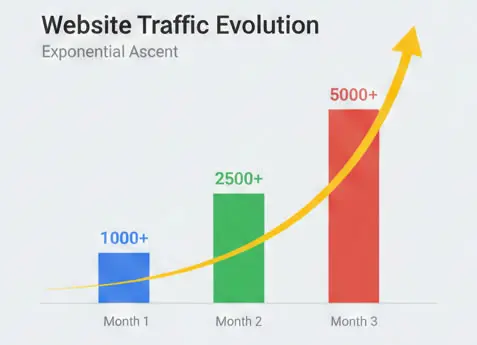
I’m not just talking theory here. By applying this exact framework, I watched one of my new niche sites surge from zero to over 5,000 monthly sessions in just 90 days. This is the exact Battle-Tested Playbook I use to turn hard work into a traffic-generating asset.
Whether you’re a complete newbie or just want to streamline your process, follow these 9 steps to turn your WordPress site into a traffic machine.
Phase 1: Pre-Writing & Strategy (The Blueprint)
Before you open a blank document, do the heavy lifting. Writing without a keyword strategy is like driving without a GPS—you might enjoy the view, but you won’t reach your destination.
Step 1: Pick a Topic That Solves a Real Problem
Don’t just write about “whatever feels right.” To rank in 2026, you must marry your personal experience with what readers are actively searching for.
The “Flesh & Skeleton” Strategy
Use this mental model:
- The Skeleton (Keywords): What people type into Google (the demand).
- The Flesh (Story/Experience): Your unique solution (the value).
Focus on the Reader’s Pain (E-E-A-T)
Google’s algorithm prioritizes E-E-A-T (Experience, Expertise, Authoritativeness, and Trustworthiness). The “E” for Experience is your advantage over AI.
AI can define “freelancing,” but it can’t explain how you overcame a specific billing nightmare.
Action Plan:
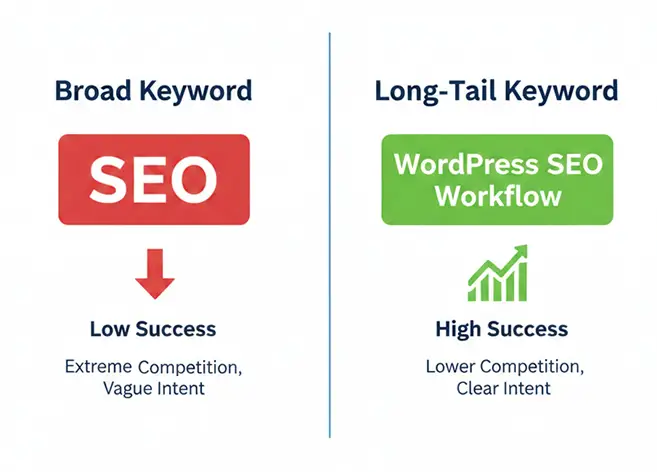
- Target Long-Tail Keywords: Stop trying to rank for broad terms like “SEO.” Instead, target “WordPress SEO workflow for beginners.” Lower volume, but higher intent.
- Find Semantic Keywords (The Support Crew): Don’t just stare at one keyword. Use free tools to find related terms to include naturally.
- Tools: Google Auto-Suggest (the search bar dropdown), AnswerThePublic, or the Keyword Surfer browser extension.
- Example: If writing about coffee, include beans, brewing, roast, and caffeine.These are contextual terms that help Google understand your topic.
Pro Tip: If you have a great personal story but no keyword, pivot the angle. Instead of a rant about “My annoying day,” frame it as “5 Productivity Hacks for When You Feel Overwhelmed.” Now it solves a problem.
Phase 2: Content Creation (Writing for the Web)
Once the skeleton is ready, put flesh on the bones.
Remember: writing for the web is not like writing a college essay.
Step 2: Draft with a “Hook” and Scannable Structure
We live in a “scroll culture.” Attention spans are short. You have about 3 seconds to convince a reader to stay.
The Hook Formula
Never start with “In this article, I will discuss…” Instead, use this formula:
- Pain Point + Personal Experience + Promise.
- Example: “Struggling to get traffic? I posted daily for months and got nowhere until I fixed one setting. Here is exactly how to fix it…”
The Rule of Three (Breaking the Wall of Text)
Nothing kills a mobile reader faster than a giant block of text.
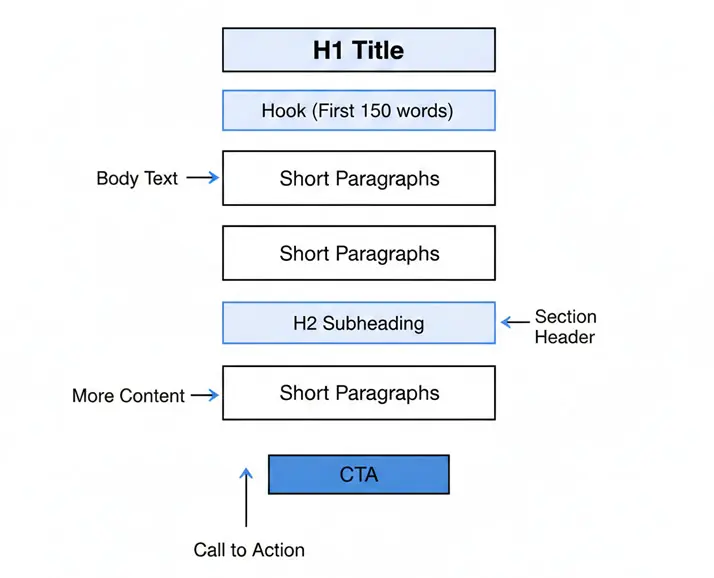
- Keep paragraphs under 3 lines on desktop.On a mobile screen, that same paragraph stretches to 5-6 lines. Anything longer looks like a homework assignment, and users will bounce.
- The H2/H3 Rhythm: Insert a subheading every 300 words. This gives the reader’s eyes a break and helps skimmers find answers.
Word Count Goals
- Ideal Range: 1,500 – 2,500 words.
- Minimum: 1,000 words. Less than 1,000 words on a complex topic is often viewed as “thin content.”
- Analyze the top 3 results—if they wrote 2,000 words, aim for 2,200 with better examples
Step 3: Use a Table of Contents (The Navigation Hack)
Tables of Contents (TOC) aren’t just for textbooks. They provide clear structure and allow users to jump straight to the solution they need.
Pro Configuration:
- Plugin: Install a plugin like Easy Table of Contents. It automatically generates a list based on your H2s and H3s.
- The SEO Benefit: Google often pulls these links directly into search results (“Jump to links”), making your listing look larger and increasing Click-Through Rate (CTR).
- Auto Insert: On.
- Numbering: OFF. Modern design is minimal; avoid visual clutter. Indentation of H2s and H3s provides enough hierarchy.
- Mobile View: Consider the “Initially Hide” setting so the TOC doesn’t push your “Hook” too far down the screen on mobile devices.
However, ensure the “Table of Contents” button is visible so users can open the roadmap if they need it.
A quick pro-tip: Make sure your TOC plugin uses lightweight CSS. You want it to be functional, not bloated. If the code is too heavy, it can drag down your LCP (Largest Contentful Paint), making your page feel sluggish to both Google and your readers.
Phase 3: Visual & Technical Optimization
The text is done. Now, make it look good and load fast.
Step 4: Optimize Images (The Speed Factor)
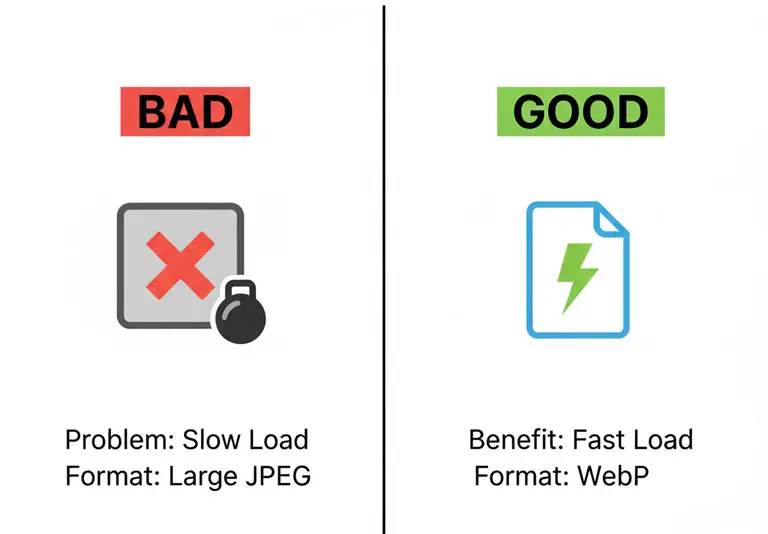
Giant, uncompressed images are the silent killers of website speed.
If your site fails Google’s Core Web Vitals, your rankings will tank.
The Image Protocol:
- Format: Strictly use WebP. It is superior to JPEG/PNG.
- Tools: Use plugins like ShortPixel, Imagify, or EWWW Image Optimizer to auto-convert uploads.
- File Naming (Crucial SEO):
- Bad: IMG_5921.JPG or Screenshot 1.png
- Good: hostinger-dashboard-speed-test.webp
- Rule: Use hyphens – to separate words. No underscores, no spaces.
- Alt Text: This is the only way Google understands your image. Be descriptive.
- Example: “Hostinger hPanel dashboard showing a speed test result of 150ms.”
Don’t stop at formats and keywords. Always define your image Width & Height attributes. This prevents that annoying ‘layout jump’ when a page loads, also known as CLS (Cumulative Layout Shift). Keeping your layout stable is a massive part of a great User Experience and a key Google ranking factor.
Phase 4: On-Page SEO (The Technical Polish)
This is where you talk to the robots. Use Rank Math (the free version is excellent), though Yoast SEO or All in One SEO (AIOSEO) work similarly.
Step 5: Fix the URL Slug & Meta Description
Stop! Do not publish without checking the URL (permalink).
By default, WordPress might create: domain.com/10-shocking-shared-hosting-traps-that-cost-me-500-dollars/
This is too long and gets cut off in search results.
The Golden Formula: /focus-keyword-only/
- Correct: domain.com/shared-hosting-traps/
- Rule: Use your focus keyword only. Remove “stop words” (a, the, in) and avoid using years or dates so you can update the post later without breaking the link.
The Meta Description: Never let WordPress auto-generate this. Write a custom 160-character pitch in Rank Math.
- Pro Tip: Copy your Rank Math description into the “Excerpt” box in the WordPress sidebar so it displays correctly in your theme’s archives.
Step 6: Aim for a Green Score (But Don’t Obsess)
Rank Math gives you a score out of 100.
- The Goal: 80+ (Green).
- The Strategy: If you’ve optimized your URL, images, and description, hitting 80 is easy. If you’re stuck, increase keyword density slightly and add an external link to an authoritative site (like Wikipedia or a major tech journal).
- The Warning: Do not obsess over getting 100/100. Forcing keywords into every sentence to get a perfect score leads to “keyword stuffing,” which Google penalizes. If it turns green, move on. Focus on readability.
Step 7: Use Advanced Schema (Visibility Booster)
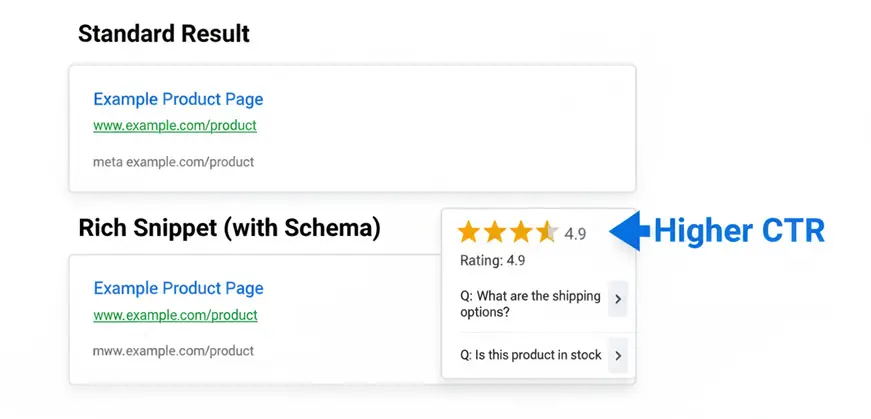
Schema Markup helps Google understand your content and can give you “Rich Snippets” (those fancy star ratings or FAQs in search results).
- FAQ Schema: Add an FAQ section using the Rank Math FAQ Block. It doubles your visual real estate in Google. (Note: Rank Math handles the code, so just write your Q&A naturally).
- Summary Box: For long guides (1,500+ words), add a 2-sentence summary with a clear rating. It helps users who want the answer fast and boosts conversion.
Can I use both? Yes, and you should! The Summary is for user conversion (clicks to your offer), while the FAQ is for SERP visibility (clicks from Google).
Phase 5: Compliance & Mobile Checks
Almost there. Just a few legal and safety checks.
Step 8: Legal Disclosures(Affiliate)
If you monetize your blog, you must follow FTC laws and Google’s Spam Policy.
- The Disclosure: Place a clear sentence at the very top of your post: “This post contains affiliate links. If you make a purchase, I may earn a commission at no extra cost to you.”
- Link Attributes: Set all affiliate links to Open in New Tab and tag them as rel=”sponsored” and rel=”nofollow”. Leaving them as “dofollow” can risk penalties.
Step 9: The “Mobile-First” Reality Check
Before hitting publish, grab your phone or tablet. Open the “Preview” link on a mobile device.
- Check: Is the table of contents blocking the content?
- Check: Are tables scrolling horizontally or getting cut off?
- Check: Is the font size readable without zooming?
Google uses Mobile-First Indexing. It ranks your site based on the mobile version, not the desktop version. If the mobile experience is poor, your rankings will suffer.
Phase 6: The Post-Publishing Loop
90% of beginners stop once they hit publish. Don’t be one of them.
- Internal Linking: Immediately go to 3-5 old articles and add links pointing to your new post. This helps Google index your new content faster.
- Content Freshness: If you write a “Best of 2026” guide, update it in 2027. Go back, update the title, refresh the content, and change the “Last Updated” date . Google rewards updated timestamps and fresh data.
Conclusion: Consistency is the Key
SEO isn’t magic; it’s a process. It feels overwhelming at first—checking URLs, compressing images, and obsessing over headings—but after a few posts, this workflow becomes muscle memory.
SEO isn’t magic; it’s a discipline. It feels overwhelming at first—checking URLs, compressing images, and obsessing over headings—but give it three posts, and this workflow will become muscle memory.
By following this Battle-Tested Playbook, you stop shouting into the void and start building an asset that grows over time.
Still have a few lingering doubts? You’re not alone. I’ve rounded up the 4 most common questions I get from fellow bloggers to help you hit the ground running.
Frequently Asked Questions (FAQs)
How long does it take for a new WordPress post to rank on Google?
While it varies, with a solid SEO workflow like this, you can usually see initial indexing within days and meaningful ranking moves within 3 to 6 months.
My post is high-quality, but it’s still not ranking. What am I missing?
Often, the culprit is Search Intent mismatch. Google doesn’t just look for “good” writing; it looks for the type of content users want. If everyone on page one is sharing a “Listicle” and you wrote a “Long-form Essay,” you’re fighting an uphill battle. Match the format Google already likes, and you’ll see results.
Is it okay to use AI tools like ChatGPT to write my blog posts?
Yes, but use it as a co-pilot, not an autopilot. AI is incredible for brainstorming and outlining, but Google’s 2026 algorithms crave “Information Gain”—unique insights that only a human can provide. Use AI to speed up the process, but always inject your personal experience and “vibe” to keep it ranking-ready.
Do I need to be a coder to do WordPress SEO?
Not at all. WordPress and its ecosystem of plugins (like Rank Math) handle the heavy lifting. Your job is to focus on content structure and strategic settings. If you can follow a checklist, you can rank on Google.
Ready to build a blog that actually makes an impact (and money)?
I’m constantly testing new SEO strategies so you don’t have to. If you want to learn more SEO secrets and build a popular, profitable blog alongside me, bookmark this site and join my VIP Email List today. I’ll send you my personal checklists and the latest growth hacks directly to your inbox!