Disclosure: To support my SEO practice blog, this post contains affiliate links. If you make a purchase through these links, I may earn a commission at no additional cost to you. In fact, using my link often secures an exclusive discount for you. I only recommend services I’ve personally used and trust!
Hey, it’s Pivo again! If you read my last post about the domain registration disaster , you know I’ve been through the wringer. Now, I’m sharing everything I learned about finding the right shared hosting for beginners to help you avoid the same massive hurdles I faced.
Now, let’s talk about the next massive hurdle: web hosting.
I’m a digital marketing beginner with a super tight budget, and diving into the world of “shared,” “VPS,” “cloud,” and “dedicated” hosts felt like trying to read ancient Greek.
My journey was full of anxiety, buyer’s remorse, and a surprisingly huge win with customer service that frankly, felt like a major life achievement for an anxious newcomer!
This is the full, honest account of my web hosting lessons, mistakes, and the money-saving hacks I discovered.
Trap #1: The “Pro” Trap (Why You Don’t Need a VPS Yet)
When you’re just starting, the first choice you face is overwhelming: what type of hosting do I actually need?
My goal was simple: launch a WordPress blog quickly, practice my SEO strategies, and keep costs razor-thin.
The “trap” here is reading other blogs that convince you that you need a high-performance Virtual Private Server (VPS) from day one.
After researching the two most common options, I broke it down:
Shared Hosting vs. VPS: Which One to Choose?
| Feature | Shared Hosting | Virtual Private Server (VPS) |
| Ease of Setup | Extremely simple; usually one-click WordPress install. | Complex; requires back-end server knowledge. |
| Price | Very cheap (the lowest barrier to entry). | Mid-range price; significantly more expensive. |
| Performance | Lower performance; you share resources. | Higher performance; dedicated resources. |
| Control | Minimal control; provider manages everything. | Maximum control; you are the server admin. |
| Target User | “SEO Beginners, Bloggers, Small Portfolio Sites.” | “Experienced developers, high-traffic sites.” |
The Verdict: I quickly realized that VPS, while offering high freedom, also demanded a level of backend knowledge I simply didn’t have.
My job is to focus on content and SEO strategy, not server management.
Shared hosting for beginners was the clear winner for its simple setup and cheap price, allowing me to pour my limited energy and funds into building out the blog.
Trap #2: The “Hidden Cost” Trap (Missing SSL & Essential Features)
Once I settled on shared hosting, I became a hawk, comparing the major providers.
This is “Rookie Mistake #1”: just looking at the sticker price and ignoring the fine print.
As a bootstrap beginner, my logic was pragmatic:
“As a newbie, my traffic will likely be low for the first few months. A cheap, entry-level plan will be more than enough… If my SEO efforts actually succeed and traffic explodes? That’s a great problem to have, and then I can happily upgrade.”
The “trap” isn’t the cheap price; it’s the features they don’t include, forcing you to pay extra later.
Before choosing a provider (I eventually landed on Hostinger for its affordability), I compiled this list of non-negotiable key features:
- ⚡️ Free SSL Certificate: Google demands security (HTTPS). If a host makes you pay for this, move on.
- 🔗 One-Click WordPress Install: Crucial for beginners. Avoid any host that makes you manually upload files.
- 💾 Generous SSD Storage: SSDs are faster. Look for plans with at least 50GB of fast SSD storage.
- 📧 Free Email Accounts: A professional email (e.g., [email protected]) instantly boosts your credibility.
Trap #3: The “Renewal Shock” Trap (Why Long-Term Plans Save More)
This is arguably the most important lesson I learned about cheap web hosting: you must always factor in the long-term investment!
The “trap” is the renewal price.
Many hosts offer incredible promotional prices that are ideal for bootstrap beginners.
I chose the 48-month plan at Hostinger because it offered the biggest discount—perfect for my meager budget. I locked in a super low monthly rate for four years.
Here’s the crucial budget note:
While the introductory price is incredibly cheap, most quality hosting services increase their rates upon renewal.
You should treat that initial long term as a grace period!
Plan to either migrate your site to a new host near the end of the term… or, more optimistically, your success will mean you’ll need to upgrade to a faster VPS anyway!
As beginners with limited funds, controlling that initial launch cost is key to survival, and a long-term introductory package provides the ultimate financial stability.
Trap #4: The “Support Wall” Trap (And The Secret to Human Support)
When I paid for my discounted 48-month plan, the order got stuck on “Pending Confirmation.”
I won’t lie, my stomach dropped. As a beginner, every little technical hiccup feels like a sign that you’re doing something fundamentally wrong. Anxiety level: 10/10.
I decided I had to talk to a person immediately. This is the trap: I couldn’t easily find a live chat entry point, only the robotic chatbot, Kodee.
I was ready to give up until I tried typing “live chat” directly into the bot. Eureka! The secret phrase unlocked the real, human customer support queue!
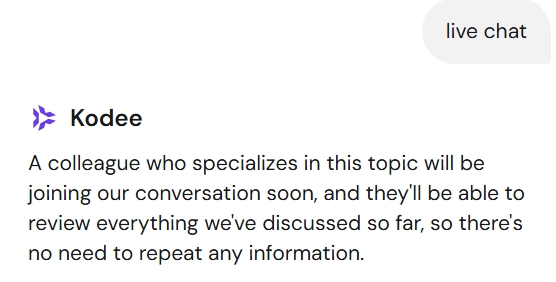
The human agent was incredibly helpful. She quickly cancelled the stuck order.
I paid again using a different method, and BAM! The transaction went through instantly. Instant relief.
This experience was stressful, but it’s honestly the moment that sold me on the service. When I was at my most anxious, their customer support was fast, human, and solved my problem instantly. It’s the main reason I’m now confidently recommending them.
You can get an extra 20% off your own plan today by using my personal recommendation link! Click Here
The site was live, WordPress installed seamlessly, and I was finally ready to focus on content.
Trap #5: The “Data Loss” Trap (Why Automated Backups Are Non-Negotiable)
This trap is silent, but it’s the most costly. Among my checklist of essential features was one I refused to compromise on: Automated Backups.
The trap is assuming your host is doing this for you, or that the basic backup included is enough.
Your content is your asset. Imagine spending six months writing content, your SEO finally starts to work, and then a bad plugin update or a hack wipes out your entire site.
Losing all that work is the ultimate “costly trap.” I made sure my plan included automatic weekly or daily backups before I ever entered my credit card details.
💸 Bonus Hack: How I Negotiated 3 Free Months (Even After Buying)
This isn’t a trap, but a major win that came from facing my fear.
A few days later, while scrolling through my emails, I saw it: a new Black Friday promotion from Hostinger.
The deal included an extra three months of service for free with a new 48-month plan.
My heart sank again: I had missed the bonus!
My inner social anxiety was screaming at me to just accept the loss, but the desire for those three months pushed me.
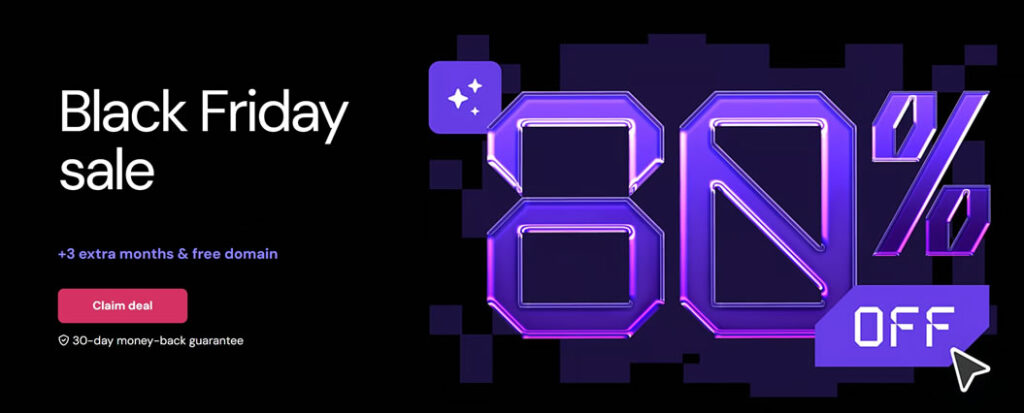
I took a deep breath, went back to the live chat (thankfully, I knew the “live chat” trick now!), and politely explained my situation.
The agent was fantastic. A few hours later, I got the email: my account was successfully credited with three additional free months!
I was over the moon! I successfully negotiated a budget win!
Pro Tip for Poor Beginners: If you buy a plan and a better promotion pops up within the refund window (usually 30 days), ASK THE HOST!
The worst they can say is no, and you might just get an unexpected, money-saving win.
My Verdict: Why Hostinger Worked for My SEO Launch
My site now runs on the 48-month shared hosting plan I snagged, and so far, my personal experience has been overwhelmingly positive.
The WordPress integration was seamless, the platform is easy to navigate, and the stability is great for my beginner traffic levels.
For any other beginner who is scared of the technical stuff and hyper-focused on content creation, I highly recommend finding a host that prioritizes simplicity and low initial cost, just like I did.
And remember, don’t be afraid to talk to customer service!
Ready to launch your own site with the best shared hosting for beginners without breaking the bank?
You can get an extra 20% off your own plan today by using my personal recommendation link! Click Here
Frequently Asked Questions (FAQs)
My plan doesn’t include a professional email address! What now?
Don’t panic! If your host charges extra for email, the best “poor beginner” hack is using Cloudflare Email Routing. You can create a professional-looking email (like [email protected]) for free and have everything forwarded straight to your personal Gmail. It’s a total life-saver when you’re trying to keep your startup costs near zero.
Should I actually use the “Free Domain” offered by web hosts?
It’s a bit of a double-edged sword. While “free” is great for your first year, always double-check the renewal price. Some hosts will lure you in with a freebie and then charge you $20+ the following year. I personally prefer checking the long-term cost first—sometimes it’s actually cheaper to buy your domain separately from a dedicated domain registrar to keep your recurring costs as low as possible.
Do I need to buy expensive WordPress themes or plugins right away?
Honestly? No. When you’re just starting with shared hosting for beginners, your focus should be on content, not fancy design. Stick to fast, free themes like Astra or GeneratePress. They are incredible for SEO and won’t bloat your site. You can always upgrade to “Pro” versions once your blog starts actually making money.
Is the SSL certificate really free, or is that another hidden fee?
In this day and age, SSL should be 100% free. Most reputable hosts provide a “Let’s Encrypt” certificate at no extra charge. If you see a host trying to bill you $50 a year just for that little “padlock” icon in the browser, run! It’s a standard SEO requirement now, and you shouldn’t have to pay a dime for it.
What happens if my blog goes viral? Can I upgrade my plan later?
That’s the beauty of starting small! You can launch on a basic shared hosting for beginners plan to save money now, and most hosts make it super easy to upgrade to a more powerful server with just one click. You won’t have to worry about manual migrations or losing your data—the host handles the heavy lifting as your traffic grows.
Does it actually matter where my server is located for my SEO?
It really does! You want your server to be as physically close to your target audience as possible. If you’re writing for a US-based audience, pick a US data center. This makes your site load faster for them, and since Page Speed is a major Google ranking factor, it gives your SEO a nice little head start.
Stop Overthinking and Start Building!
You’ve got the strategy, you know the traps, and you have the budget hacks. The only thing left is to take action.
Don’t let “analysis paralysis” stop you. Launch your site on the best shared hosting for beginners today, lock in that low price, and let’s get your SEO traffic flowing.
Use the link below to claim your exclusive discount and support my work at no extra cost to you!